
Azure DevOps Practices: CI/CD, Agents, On-Prem Setups, and Git Flow
If Azure DevOps feels heavy at first, you are not alone. Most teams do not fail because the tools are bad. They fail because the setup is unclear, too fast, or too advanced too early.
This guide is a softer, practical version you can share with junior and senior teammates. We keep the language simple, explain the why behind each step, and use visual maps instead of complex documentation screenshots.
1. CI/CD Baseline You Can Trust
Before we talk about production, we need one stable baseline:
- Build the app
- Run tests
- Publish one artifact
- Deploy that same artifact through environments
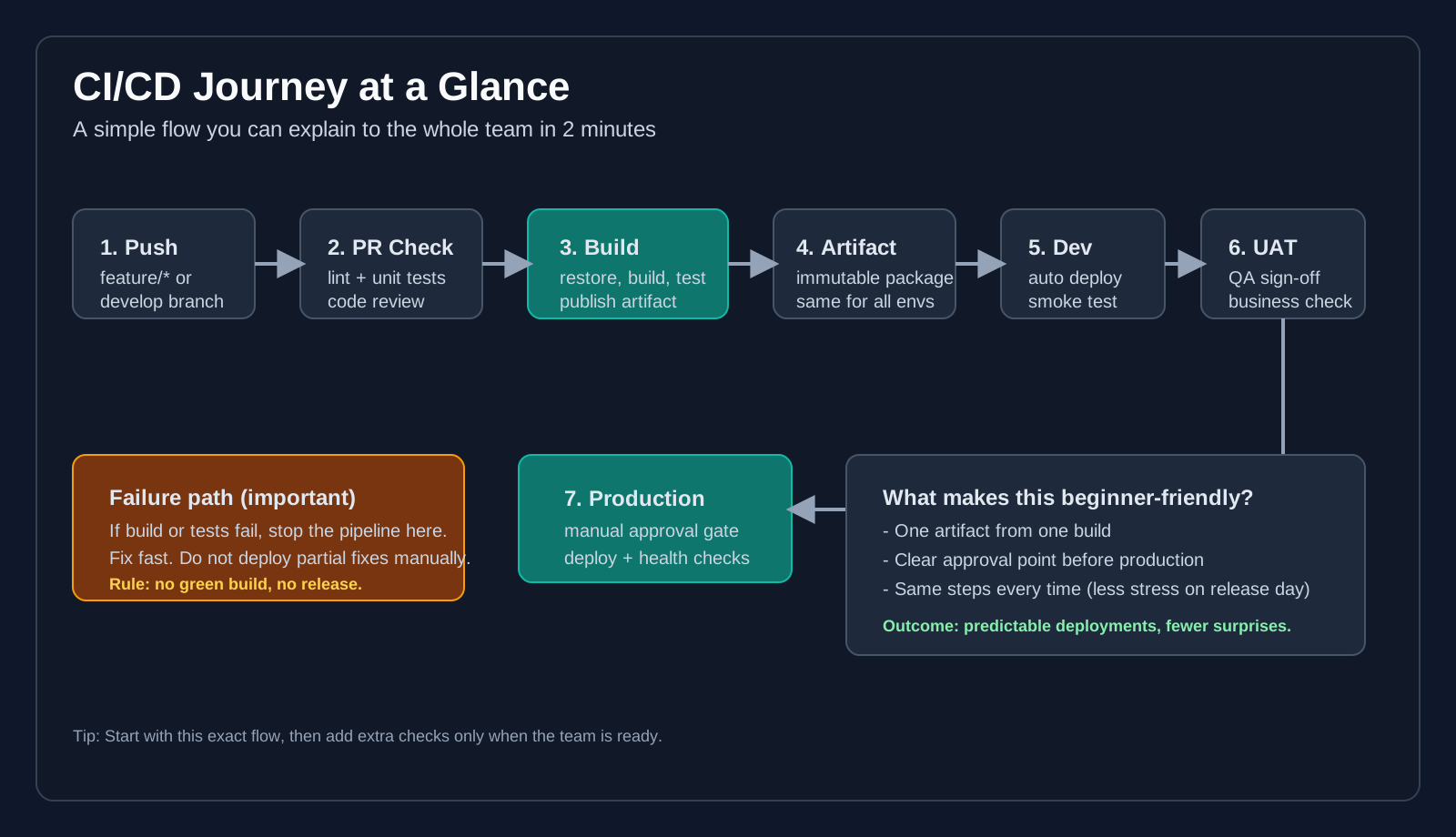 Visual map of a beginner-friendly CI/CD flow from commit to production.
A minimal YAML example:
trigger:
  branches:
    include:
      - develop
      - main
      - release/*
      - hotfix/*

pool:
  vmImage: "ubuntu-latest"

variables:
  buildConfiguration: "Release"

stages:
  - stage: BuildAndTest
    jobs:
      - job: Build
        steps:
          - task: UseDotNet@2
            inputs:
              packageType: "sdk"
              version: "8.0.x"

          - script: dotnet restore
          - script: dotnet build --configuration $(buildConfiguration) --no-restore
          - script: dotnet test --configuration $(buildConfiguration) --no-build
          - script: dotnet publish src/MyApi/MyApi.csproj -c $(buildConfiguration) -o $(Build.ArtifactStagingDirectory)/app

          - publish: $(Build.ArtifactStagingDirectory)/app
            artifact: "app"
Simple rule: if build or tests fail, stop. No manual shortcuts.
2. Choosing Agent Type (Without Guessing)
Teams usually get stuck here. The decision is easier than it looks.
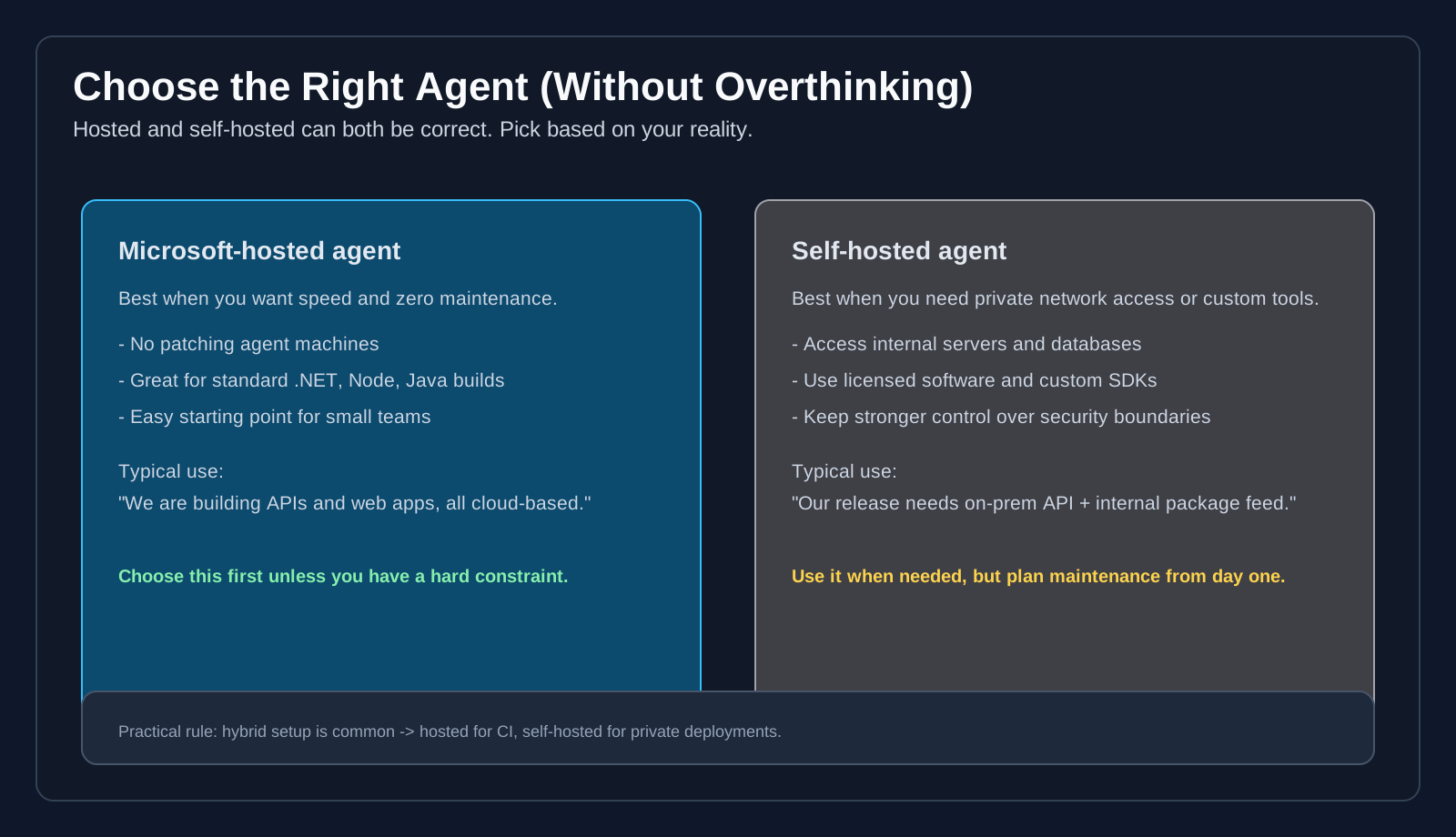 Hosted vs self-hosted decision map with practical use cases.
Use Microsoft-hosted when:
- You want the fastest setup
- Your tools are standard
- You do not need private network access
Use self-hosted when:
- You need internal network access
- You need custom/legacy tools
- You need stricter infrastructure control
A hybrid model is common and healthy: hosted for normal CI, self-hosted for private deployments.
3. Self-Hosted Agent Setup Step by Step
This is the part many people overcomplicate. Keep it as a checklist.
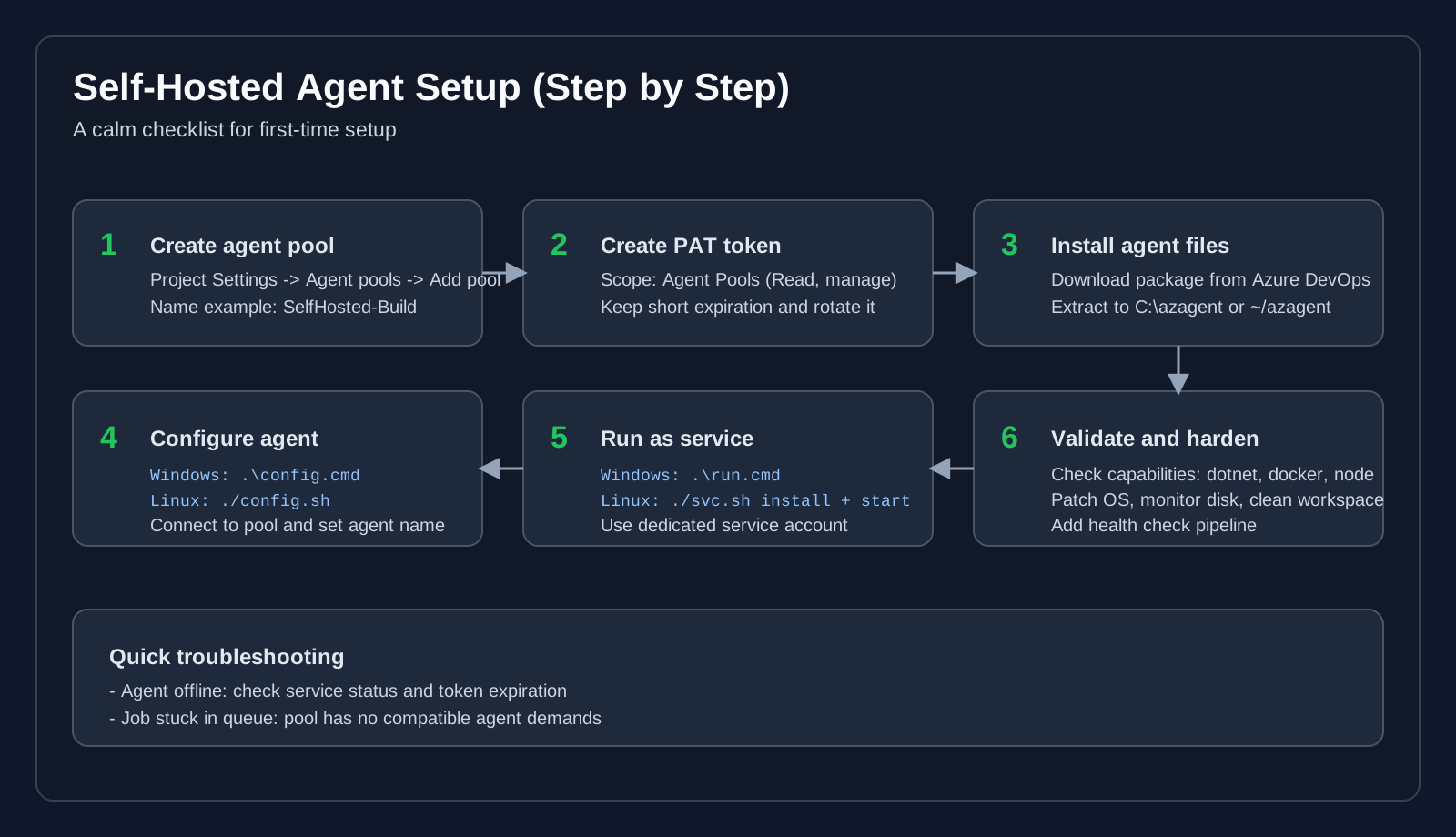 Step-by-step setup flow with common troubleshooting hints.
Step A: Create pool
Go to:
Project Settings -> Agent pools -> Add pool
Use clear names such as:
SelfHosted-BuildSelfHosted-DevDeploySelfHosted-ProdDeploy
Step B: Create PAT for registration
Use a dedicated PAT with only required scope:
Agent Pools (Read, manage)
Keep expiration short and rotate regularly.
Step C: Install agent
Windows:
mkdir C:\azagent
cd C:\azagent
# Download and extract the agent package
.\config.cmd
.\run.cmd
Linux:
mkdir -p ~/azagent && cd ~/azagent
# Download and extract the agent package
./config.sh
sudo ./svc.sh install
sudo ./svc.sh start
Step D: Validate capabilities
Your pipeline might require dotnet, docker, node, etc.
Use demands in pipeline:
pool:
  name: "SelfHosted-Build"
  demands:
    - Agent.OS -equals Linux
    - dotnet
    - docker
If jobs stay in queue, pool/agent demands mismatch is often the reason.
4. On-Prem Setup That Stays Maintainable
On-prem is not "wrong" or "old". It is often required. The key is clean structure.
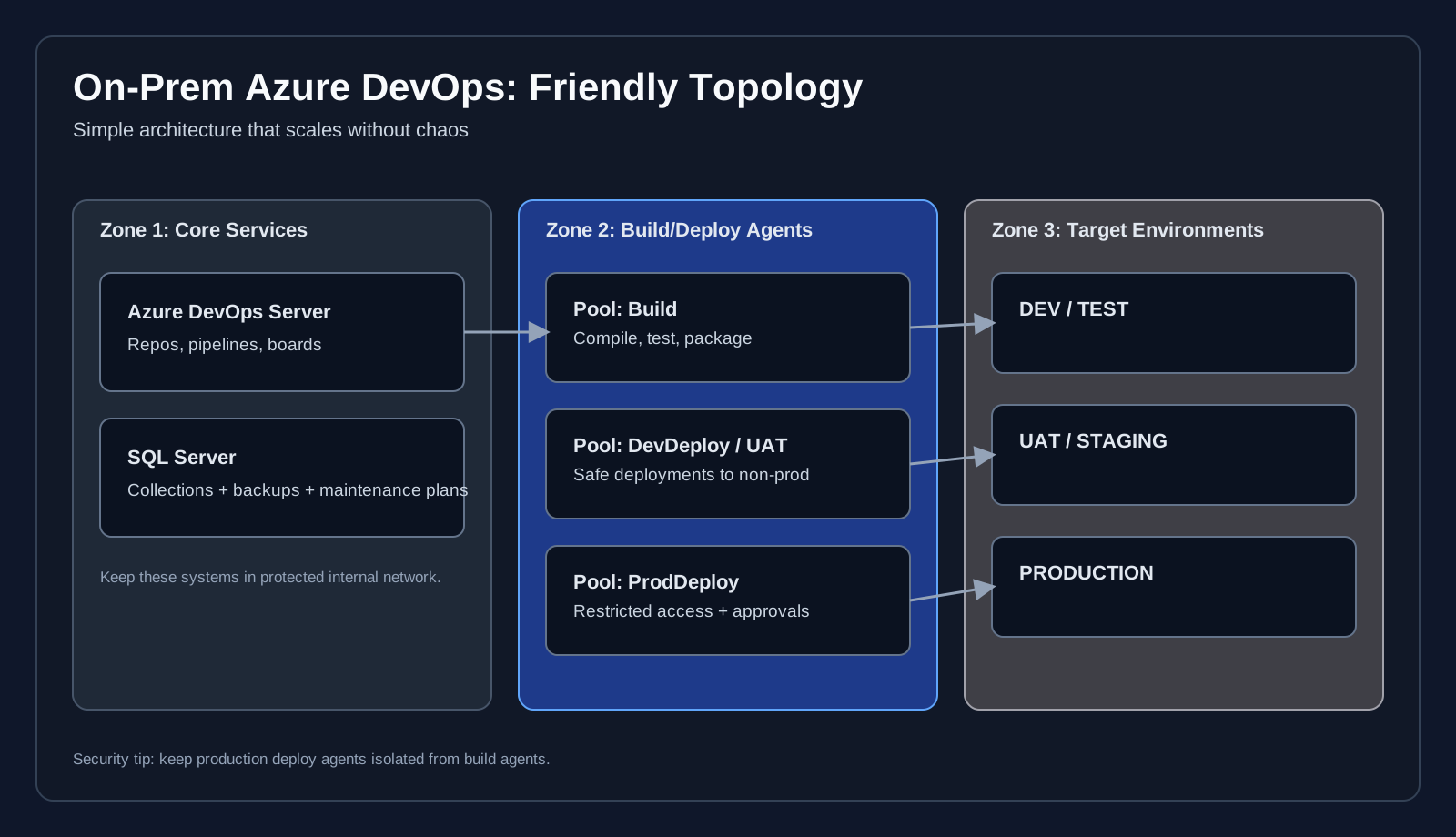 Clear zone-based layout for Azure DevOps Server, SQL, agents, and target environments.
Recommended layout:
- Azure DevOps Server + SQL in protected internal zone
- Separate agent pools by purpose and trust boundary
- Production deploy agents isolated from normal build agents
- Backups and restore drills for SQL and collections
Keep this simple and documented. Most production incidents in on-prem setups come from unclear ownership, not missing features.
5. Build and Release Pipeline Walkthrough
Many teams place everything in one long job. Better approach: staged flow with clear gates.
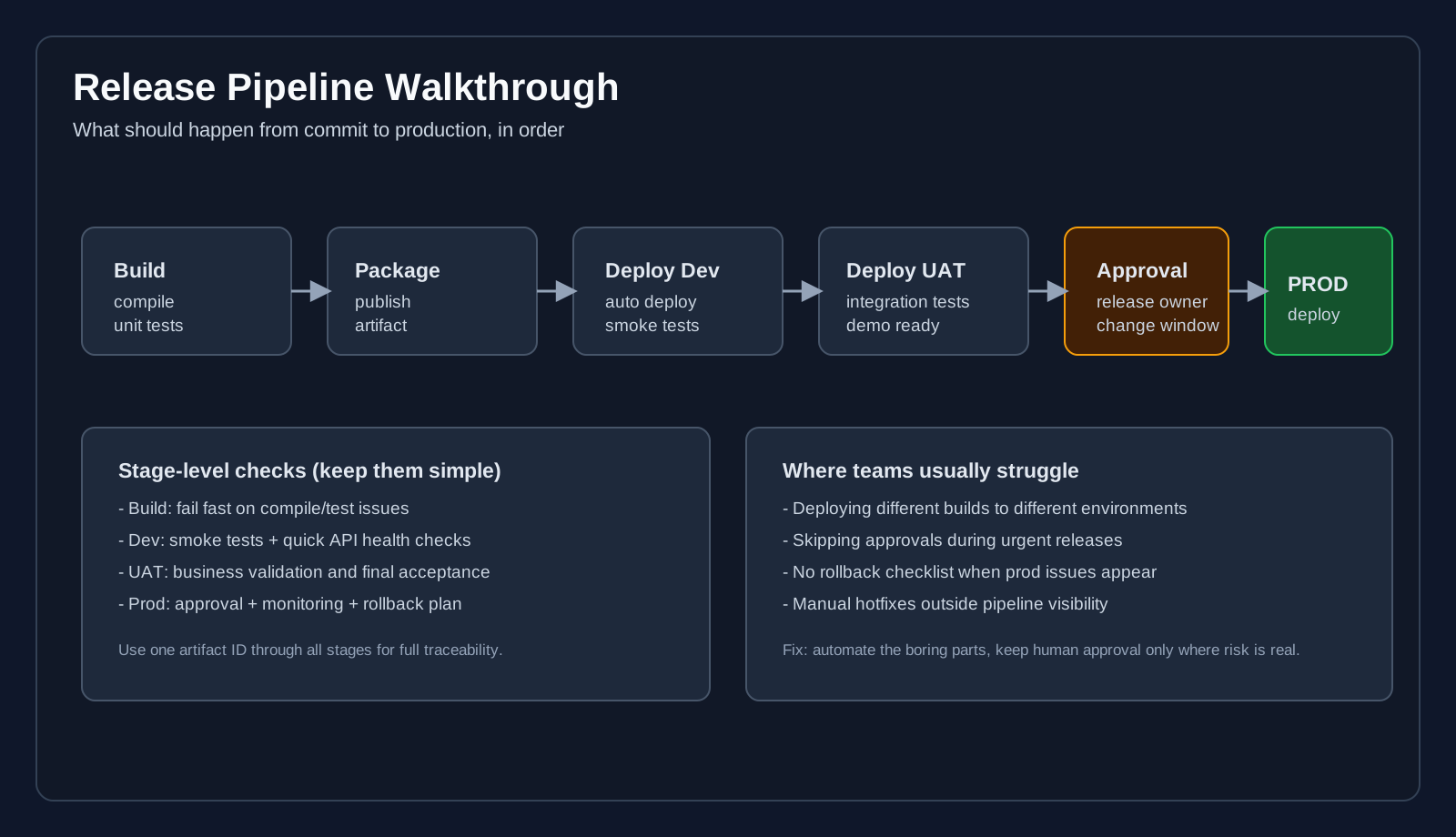 Stage-by-stage release flow with approval gate and common pain points.
A practical flow:
Build: compile + testsPackage: publish immutable artifactDeployDev: automatic deploy + smoke checksDeployUAT: integration/business checksApproval: release owner confirmsDeployProd: controlled production release
The most important part: deploy the same artifact everywhere.
6. Git Flow in Day-to-Day Work
Git Flow becomes easy when every branch has one job.
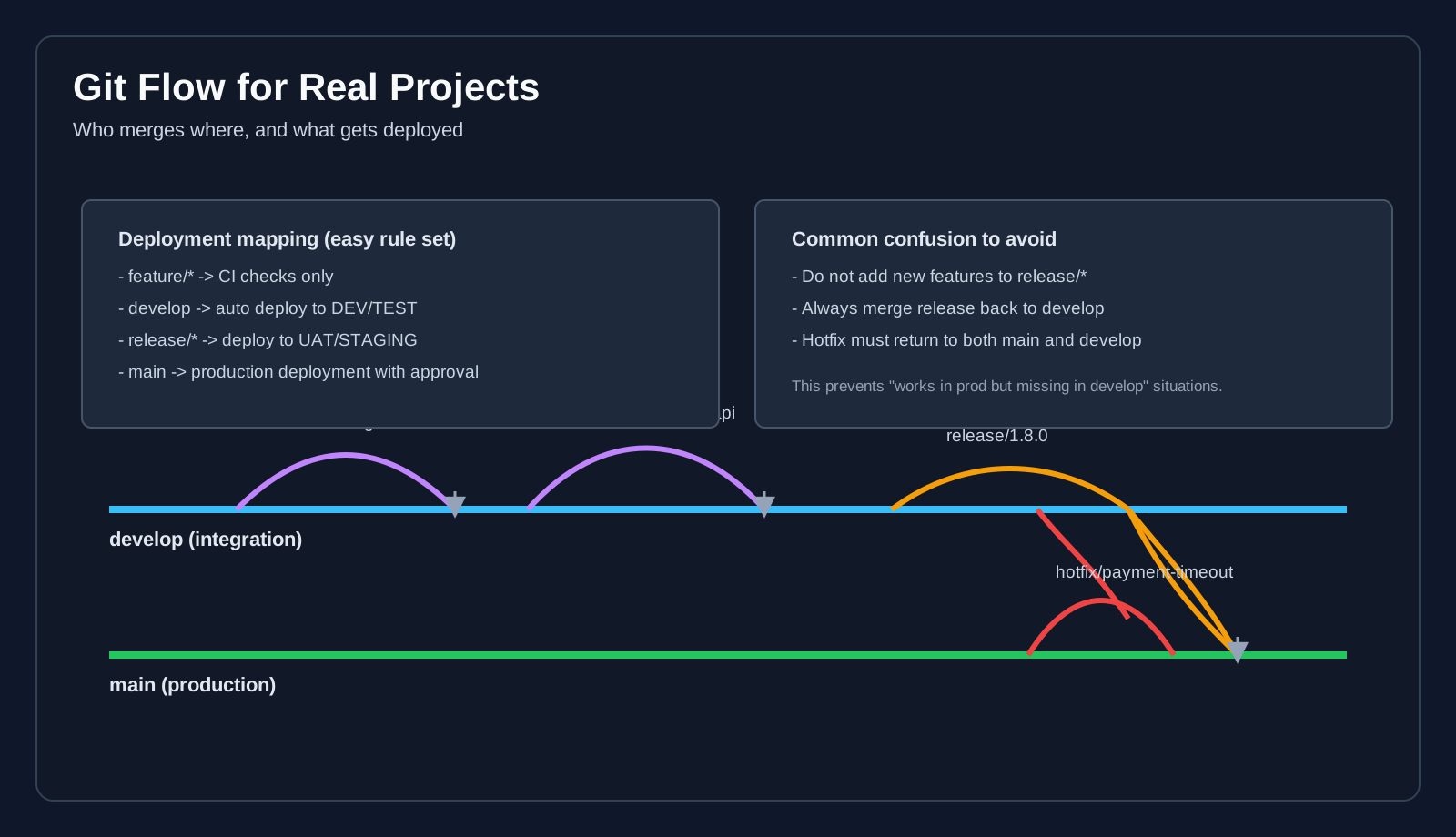 Branch responsibilities, merge direction, and deployment mapping.
Branch roles:
main: productiondevelop: integration for upcoming releasefeature/*: implementation workrelease/*: stabilization onlyhotfix/*: urgent production fixes
Pipeline mapping:
feature/*: CI checks onlydevelop: auto deploy to dev/testrelease/*: deploy to UAT/stagingmain: production with approval
Critical discipline:
- Do not add features into
release/* - Always merge release back to
develop - Merge hotfix to both
mainanddevelop
7. Common Mistakes (and Gentle Fixes)
- CI takes too long -> split tests and optimize cache
- Agent is "online" but jobs fail -> validate tool versions and permissions
- Manual deploy done outside pipeline -> move it into YAML for traceability
- Production release panic -> create a rollback checklist before go-live
You do not need a perfect setup on day one. You need a setup the team can repeat safely.
Best Practices Summary
- Start with one clean CI/CD flow and keep it visible.
- Choose agent type based on network/tool constraints, not preference.
- Separate self-hosted pools by risk and environment.
- Keep release pipeline staged and approval-driven.
- Use one artifact per release across all environments.
- Keep Git Flow simple and enforce the merge rules.
Conclusion
Azure DevOps can be calm and predictable when the workflow is clear. Start small, make each stage visible, and keep your process understandable for the whole team, not only senior engineers.
If your team can explain the pipeline in plain language, your delivery process is in a good place.